Site Links
1. Java Reference (java2s.com)
Link: http://www.java2s.com/

2. Java Reference (avajava.com)
Link: http://avajava.com/tutorials/

3. Java Tips (javatips.net)
Link: https://www.javatips.net/


1 2 3 4 5 6 7 8 9 10 11 12 | public static void showNetworkStatus(Context context) { final ConnectivityManager connMgr = (ConnectivityManager)context.getSystemService(Context.CONNECTIVITY_SERVICE); boolean wifi = connMgr.getNetworkInfo(ConnectivityManager.TYPE_WIFI).isAvailable(); boolean mobile = connMgr.getNetworkInfo(ConnectivityManager.TYPE_MOBILE).isAvailable(); boolean bluetooth = false; if( android.os.Build.VERSION.SDK_INT >= android.os.Build.VERSION_CODES.HONEYCOMB_MR2 ) { bluetooth = connMgr.getNetworkInfo(ConnectivityManager.TYPE_BLUETOOTH).isAvailable(); } Toast.makeText(context, "wifi: " + wifi + ", mobile: " + mobile + ", bluetooth: " + bluetooth , Toast.LENGTH_SHORT).show(); } |
1 2 3 4 5 6 7 8 9 | @SuppressLint("NewApi") public static void showScreenSizeInPixel( Activity activity ) { Display display = activity.getWindowManager().getDefaultDisplay(); DisplayMetrics outMetrics = new DisplayMetrics (); display.getMetrics(outMetrics); Toast.makeText( activity , "w: " + outMetrics.widthPixels + ", h: " + outMetrics.heightPixels , Toast.LENGTH_SHORT).show(); } |

1 2 3 4 5 6 7 8 9 10 11 12 | @SuppressLint("NewApi") public static void showScreenInfo( Activity activity ) { Display display = activity.getWindowManager().getDefaultDisplay(); DisplayMetrics outMetrics = new DisplayMetrics (); display.getMetrics(outMetrics); float density = activity.getResources().getDisplayMetrics().density; float dpHeight = outMetrics.heightPixels / density; float dpWidth = outMetrics.widthPixels / density; Toast.makeText( activity, "density: " + density + ", wdp: " + dpWidth + ", hdp: " + dpHeight , Toast.LENGTH_SHORT).show(); } |

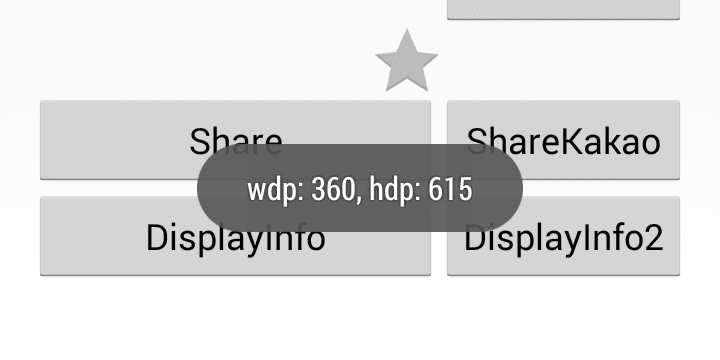
1 2 3 4 5 6 7 | @SuppressLint("NewApi") public static void showScreenSizeDp( Activity activity ) { Configuration configuration = activity.getResources().getConfiguration(); Toast.makeText( activity, "wdp: " + configuration.screenWidthDp + ", hdp: " + configuration.screenHeightDp , Toast.LENGTH_SHORT).show(); } } |
if (Build.VERSION.SDK_INT < Build.VERSION_CODES.JELLY_BEAN ) {
    getWindow().setFlags(
        WindowManager.LayoutParams.FLAG_FULLSCREEN,
        WindowManager.LayoutParams.FLAG_FULLSCREEN);
} else {
    View decorView = getWindow().getDecorView();
    int uiOptions = View.SYSTEM_UI_FLAG_FULLSCREEN;
    decorView.setSystemUiVisibility(uiOptions);
}
if (Build.VERSION.SDK_INT < Build.VERSION_CODES.JELLY_BEAN ) {
    getWindow().setFlags(
        0,
        WindowManager.LayoutParams.FLAG_FULLSCREEN);
} else {
    View decorView = getWindow().getDecorView();
    int uiOptions = decorView.getSystemUiVisibility();
    uiOptions &= ~View.SYSTEM_UI_FLAG_FULLSCREEN;
    decorView.setSystemUiVisibility(uiOptions);
}
1 2 3 4 5 6 7 8 9 10 11 12 13 14 15 16 17 18 19 20 21 22 23 24 25 26 27 28 29 30 31 32 33 34 35 36 37 38 39 40 41 42 43 44 45 | package com.example.actionbar; import android.annotation.SuppressLint; import android.os.Build; import android.os.Bundle; import android.support.v7.app.ActionBarActivity; import android.view.View; import android.view.WindowManager; @SuppressLint("NewApi") public class MainActivity extends ActionBarActivity { @Override protected void onCreate(Bundle savedInstanceState) { super.onCreate(savedInstanceState); setContentView(R.layout.activity_main); getActionBar().setTitle("ActionBar Title"); getActionBar().setSubtitle("ActionBar Subtitle"); } public void onClicNotificationBarHide(View v) { if (Build.VERSION.SDK_INT < Build.VERSION_CODES.JELLY_BEAN ) { getWindow().setFlags( WindowManager.LayoutParams.FLAG_FULLSCREEN, WindowManager.LayoutParams.FLAG_FULLSCREEN); } else { View decorView = getWindow().getDecorView(); int uiOptions = View.SYSTEM_UI_FLAG_FULLSCREEN; decorView.setSystemUiVisibility(uiOptions); } } public void onClicNotificationBarShow(View v) { if (Build.VERSION.SDK_INT < Build.VERSION_CODES.JELLY_BEAN ) { getWindow().setFlags( 0, WindowManager.LayoutParams.FLAG_FULLSCREEN); } else { View decorView = getWindow().getDecorView(); int uiOptions = decorView.getSystemUiVisibility(); uiOptions &= ~View.SYSTEM_UI_FLAG_FULLSCREEN; decorView.setSystemUiVisibility(uiOptions); } } } |
1 2 3 4 5 6 7 8 9 10 11 12 13 14 15 16 17 18 19 | <LinearLayout xmlns:android="http://schemas.android.com/apk/res/android" xmlns:tools="http://schemas.android.com/tools" android:layout_width="match_parent" android:layout_height="match_parent" android:orientation="vertical" > <Button android:layout_width="match_parent" android:layout_height="wrap_content" android:text="Hide NotificationBar" android:onClick="onClicNotificationBarHide" /> <Button android:layout_width="match_parent" android:layout_height="wrap_content" android:text="Show NotificationBar" android:onClick="onClicNotificationBarShow" /> </LinearLayout> |


getActionBar().setTitle("ActionBar Title");
getActionBar().setSubtitle("ActionBar Subtitle");
2) remove subtitlegetActionBar().setSubtitle(null);
getActionBar().setIcon(R.drawable.icon);
getActionBar().hide();
getActionBar().show();
1 2 3 4 5 6 7 8 9 10 11 12 13 14 15 16 17 18 19 20 21 22 23 24 25 26 | package com.example.actionbar; import android.annotation.SuppressLint; import android.os.Bundle; import android.support.v7.app.ActionBarActivity; import android.view.View; @SuppressLint("NewApi") public class MainActivity extends ActionBarActivity { @Override protected void onCreate(Bundle savedInstanceState) { super.onCreate(savedInstanceState); setContentView(R.layout.activity_main); getActionBar().setTitle("ActionBar Title"); getActionBar().setSubtitle("ActionBar Subtitle"); } public void onClickActionBarHide(View v) { getActionBar().hide(); } public void onClickActionBarShow(View v) { getActionBar().show(); } } |
1 2 3 4 5 6 7 8 9 10 11 12 13 14 15 16 17 18 19 | <LinearLayout xmlns:android="http://schemas.android.com/apk/res/android" xmlns:tools="http://schemas.android.com/tools" android:layout_width="match_parent" android:layout_height="match_parent" android:orientation="vertical" > <Button android:layout_width="match_parent" android:layout_height="wrap_content" android:text="Hide ActionBar" android:onClick="onClickActionBarHide" /> <Button android:layout_width="match_parent" android:layout_height="wrap_content" android:text="Show ActionBar" android:onClick="onClickActionBarShow" /> </LinearLayout> |


1 2 3 4 5 6 7 8 9 10 11 12 13 14 15 16 17 18 19 20 21 22 23 24 25 26 27 28 29 30 31 32 33 34 35 36 37 | package bloggerpostsnippetjava; import java.io.IOException; import java.io.InputStream; import java.net.MalformedURLException; import java.net.URL; import java.util.Scanner; public class NetworkHttpUrl { NetworkHttpUrl() { } String readFromStream( InputStream is ) { Scanner scanner; scanner = new Scanner( is, "UTF-8" ); String s = scanner.useDelimiter("\\A").next(); scanner.close(); return s; } String getUrl(String urlStr) throws MalformedURLException, IOException { URL url = new URL(urlStr); return readFromStream(url.openStream()); } public static void main( String[] args ) { try { NetworkHttpUrl url = new NetworkHttpUrl(); String body = url.getUrl("https://www.google.com"); System.out.println(body); } catch (MalformedURLException e) { e.printStackTrace(); } catch (IOException e) { e.printStackTrace(); } } } |
1 2 3 4 5 6 7 8 9 10 11 12 13 14 15 16 17 18 19 20 21 22 23 24 25 26 27 28 | public class HttpClient { static void testGet(String urlStr, String param) throws Exception { URL url; if( param != null ) { param = "name=" + URLEncoder.encode(param); url = new URL(urlStr + "?" + param); } else { url = new URL(urlStr); } URLConnection conn = url.openConnection(); conn.setUseCaches(false); InputStream is = conn.getInputStream(); Scanner scan = new Scanner(is); while(scan.hasNext()) { System.out.println(scan.nextLine()); } scan.close(); } public static void main(String[] args) { try { testGet("http://google.com", null); } catch (Exception e) { e.printStackTrace(); } } } |
1 2 3 4 5 6 7 8 9 10 11 12 13 14 15 16 17 18 19 20 | static void testPost() throws Exception { String param = "name=" + URLEncoder.encode("value"); URL url = new URL("http://www.google.co.kr"); URLConnection conn = url.openConnection(); conn.setDoOutput(true); conn.setUseCaches(false); conn.setRequestProperty("ContentType", "application/x-www-form-urlencoded"); DataOutputStream out = new DataOutputStream(conn.getOutputStream()); out.writeBytes(param); out.flush(); out.close(); InputStream is = conn.getInputStream(); Scanner scan = new Scanner(is); while(scan.hasNext()) { System.out.println(scan.nextLine()); } scan.close(); } |
1 2 3 4 5 6 7 8 9 10 11 12 13 14 15 16 17 18 19 20 21 22 23 24 25 26 27 28 29 30 31 32 33 34 35 36 37 38 39 40 41 42 43 44 45 46 47 48 49 50 51 52 53 54 55 56 57 58 59 60 61 62 63 64 65 66 67 68 69 70 71 72 73 74 75 76 77 78 79 80 81 82 83 84 85 86 87 88 89 90 91 92 93 94 95 96 97 98 99 100 101 102 103 104 105 106 107 108 109 110 111 112 113 114 115 116 117 118 119 120 121 122 123 124 125 126 127 128 129 130 131 132 133 134 135 136 137 138 139 140 141 142 143 144 145 146 147 148 149 150 151 152 153 154 155 156 157 158 159 160 161 162 163 164 165 166 167 168 169 170 171 172 173 174 175 176 177 178 179 180 181 182 183 184 185 186 187 188 189 190 191 192 193 194 195 196 197 198 199 200 201 202 203 204 205 206 207 208 209 210 211 212 213 214 215 216 217 218 219 220 221 222 223 224 225 226 227 228 229 230 231 232 233 234 235 236 237 238 239 240 241 242 243 244 245 246 247 248 249 250 251 252 253 254 255 | import java.io.File; import java.io.IOException; import java.util.ArrayList; import java.util.List; import org.apache.pdfbox.pdmodel.PDDocument; import org.apache.pdfbox.pdmodel.PDPage; import org.apache.pdfbox.pdmodel.PDPageContentStream; import org.apache.pdfbox.pdmodel.PDPageTree; import org.apache.pdfbox.pdmodel.common.PDRectangle; import org.apache.pdfbox.pdmodel.font.PDFont; import org.apache.pdfbox.pdmodel.font.PDType0Font; import org.apache.pdfbox.pdmodel.font.PDType1Font; import org.apache.pdfbox.pdmodel.graphics.image.PDImageXObject; public class PdfCreate { PDDocument document; PDPage page; PDPageContentStream stream; PDFont font; PDFont boldFont; PDRectangle pageSize; String filename; int fontSize; int topMargin; int bottomMargin; int leftMargin; int rightMargin; int currX; int currY; public PdfCreate(String fileName) throws IOException { this.document = new PDDocument(); this.filename = fileName; this.topMargin = 72; this.bottomMargin = 72; this.leftMargin = 36; this.rightMargin = 36; this.font = PDType1Font.HELVETICA; this.boldFont = PDType1Font.HELVETICA_BOLD; this.fontSize = 14; newPage(); } public void loadFont(String fontFile, String boldFile) { try { this.font = PDType0Font.load(document, new File(fontFile)); } catch (IOException e) { this.font = PDType1Font.HELVETICA; } try { this.boldFont = PDType0Font.load(document, new File(boldFile)); } catch (IOException e) { this.boldFont = PDType1Font.HELVETICA_BOLD; } } public void save() { try { if( this.stream != null ) { this.stream.close(); } this.document.save(this.filename); this.document.close(); } catch (IOException e) { e.printStackTrace(); } } private int convY(int y) { return getPageHeight() - y - 1; } public boolean newPage() throws IOException { if( this.stream != null ) { this.stream.close(); } this.page = new PDPage(PDRectangle.A4); this.document.addPage( this.page ); this.stream = new PDPageContentStream( this.document, this.page ); this.currX = this.leftMargin; this.currY = this.topMargin; return true; } public void pageInfo() { PDPageTree pages = this.document.getDocumentCatalog().getPages(); //pages.get(0); //this.document.getPage(0); //this.document.getPages(); printf( "Pages: " + pages.getCount() ); } public int getPageWidth() { return (int)this.page.getMediaBox().getWidth(); } public int getPageContentWidth() { return (int)(getPageWidth() - getLeftMargin() - getRightMargin()); } public int getPageHeight() { return (int)this.page.getMediaBox().getHeight(); } public int getLeftMargin() { return this.leftMargin; } public int getRightMargin() { return this.rightMargin; } public int getTopMargin() { return this.topMargin; } public int getBottomMargin() { return this.bottomMargin; } private int getTextWidth( String text ) { try { return (int)((this.font.getStringWidth(text)/1000)*this.fontSize); } catch (IOException e) { e.printStackTrace(); return 0; } } public boolean printText(String text, int color, PDFont textFont) { try { List<String> lines = new ArrayList<String>(); int width = getPageWidth() - getLeftMargin() - getRightMargin(); int lastSpace = -1; while( text.length() > 0 ) { int spaceIndex = text.indexOf(' ', lastSpace + 1); if (spaceIndex < 0) { spaceIndex = text.length(); } String subString = text.substring(0, spaceIndex); float size = this.fontSize * textFont.getStringWidth(subString) / 1000; if( size > width ) { if( lastSpace < 0 ) { lastSpace = spaceIndex; } subString = text.substring(0, lastSpace); lines.add(subString); text = text.substring(lastSpace).trim(); lastSpace = -1; } else if( spaceIndex == text.length() ) { lines.add(text); text = ""; } else { lastSpace = spaceIndex; } } for (String line: lines) { this.stream.beginText(); this.stream.setFont(textFont, this.fontSize); this.stream.setNonStrokingColor((color/0x10000)%0x100, (color/0x100)%0x100, color%0x100); this.currY += this.fontSize * 1.5; printf("" + getLeftMargin() + "," + this.currY ); printf(line); this.stream.newLineAtOffset( getLeftMargin(), convY(this.currY) ); this.stream.showText(line); this.stream.endText(); } return true; } catch (IOException e) { e.printStackTrace(); return false; } } public boolean printText(String text) { return printText(text, 0, this.font); } public boolean printTextBold(String text) { return printText(text, 0, this.boldFont); } public boolean printText(String text, int color) { return printText(text, color, this.font); } public boolean printTextBold(String text, int color) { return printText(text, color, this.boldFont); } public void drawLine( int x1, int y1, int x2, int y2 ) { int width = 1; int color = 0; try { this.stream.setLineWidth(width); this.stream.setStrokingColor( (color/0x10000)%0x100, (color/0x100)%0x100, color%0x100); this.stream.moveTo( x1, convY((int)y1) ); this.stream.lineTo( x2, convY((int)y2) ); this.stream.stroke(); } catch (IOException e) { e.printStackTrace(); } } public void printLine() { printf("printLine(): " + this.currY); drawLine( getLeftMargin(), this.currY, getPageWidth()-getRightMargin(), this.currY); } public int drawImage( float x, float y, String fileName ) { try { PDImageXObject image = PDImageXObject.createFromFile(fileName, this.document); y += image.getHeight(); this.stream.drawImage(image, x, convY((int)y)); return image.getHeight(); } catch (IOException e) { e.printStackTrace(); return 0; } } public void printImage( String fileName ) { currY += drawImage( (float)getLeftMargin(), (float)currY, fileName ); } void printf(String s) { System.out.println(s); } public static void main(String[] args) throws IOException { System.out.println("Begin !"); String s = "I am trying to create a PDF file with a lot of text contents in the document. I am using PDFBox"; PdfCreate pdf = new PdfCreate("D:/document.pdf"); pdf.loadFont("malgun.ttf", "malgunbd.ttf"); pdf.printLine(); pdf.printText(s); pdf.printImage("D:/image.png"); pdf.printTextBold(s); pdf.printText(s, 0xff0000); pdf.printTextBold(s, 0xff0000); pdf.printText(" "); pdf.printLine(); pdf.save(); System.out.println("End !"); } } |

1 2 3 4 5 6 7 8 9 10 11 12 13 14 15 16 17 18 19 20 21 22 23 24 25 26 27 28 29 30 31 32 33 34 35 36 37 38 39 40 41 42 43 44 45 46 47 48 49 50 51 52 53 54 55 56 57 58 59 60 61 62 63 64 65 66 67 68 69 70 71 72 73 74 75 76 77 78 79 80 81 82 83 84 85 | package javapdfcreate; import java.io.IOException; import org.apache.pdfbox.pdmodel.PDDocument; import org.apache.pdfbox.pdmodel.PDPage; import org.apache.pdfbox.pdmodel.PDPageContentStream; import org.apache.pdfbox.pdmodel.common.PDRectangle; import org.apache.pdfbox.pdmodel.font.PDType1Font; import org.apache.pdfbox.pdmodel.graphics.image.PDImageXObject; public class JavaPdfCreate { PDDocument doc; PDPage page; PDPageContentStream pageStream; public JavaPdfCreate() { doc = new PDDocument(); } public void addPage() throws IOException { page = new PDPage(PDRectangle.A4); doc.addPage(page); if( pageStream != null ) { pageStream.close(); } pageStream = new PDPageContentStream( doc, page ); } float getPageWidth() { return page.getArtBox().getWidth(); } float getPageHeight() { return page.getArtBox().getHeight(); } public void save(String filename) throws IOException { if( pageStream != null ) { pageStream.close(); } doc.save(filename); doc.close(); } public void putString( float x, float y, String text, int color ) throws IOException { pageStream.beginText(); pageStream.setFont( PDType1Font.HELVETICA_BOLD, 12 ); pageStream.moveTextPositionByAmount( x, getPageHeight()-(y+12) ); pageStream.setNonStrokingColor((color/0x10000)%0xff, (color/0x100)%0xff, color%0xff); pageStream.drawString( text ); //new String( text.getBytes("utf-8"), "ksc5601")); pageStream.endText(); } public void putLine( float x1, float y1, float x2, float y2, int width, int color ) throws IOException { pageStream.setLineWidth(width); pageStream.setStrokingColor( (color/0x10000)%0x100, (color/0x100)%0x100, color%0x100); pageStream.drawLine( x1, getPageHeight()-y1, x2, getPageHeight()-y2 ); } public void putImage( float x, float y, String image, float w, float h ) throws IOException { PDImageXObject img = PDImageXObject.createFromFile( image, doc ); float img_w = w > 0 ? w : img.getWidth(); float img_h = h > 0 ? h : img.getHeight(); if( img_w > (getPageWidth()-x) ) { float ratio = (getPageWidth()-x) / img_w; img_w = (getPageWidth()-x); img_h *= ratio; } pageStream.drawXObject( img, x, getPageHeight()-(y+img_h+1), img_w, img_h ); } public static void main(String[] args) { JavaPdfCreate pdf = new JavaPdfCreate(); try { pdf.addPage(); pdf.putLine( 48.0f, 48.0f, pdf.getPageWidth()-48.0f, 48.0f, 2, 0x000000 ); pdf.putString( 48.0f, 54.0f, "Hello PdfBox World !", 0x000000 ); pdf.putImage( 48.0f, 70.0f, "D:/barstack.png", 0, 0); pdf.save("D:/a.pdf"); } catch (IOException e) { e.printStackTrace(); } } } |


