레이블이 android인 게시물을 표시합니다. 모든 게시물 표시

2018년 3월 25일 일요일

[Android] How to get network status


1. How to get network status

1
 2
 3
 4
 5
 6
 7
 8
 9
10
11
12
public static void showNetworkStatus(Context context) {
    final ConnectivityManager connMgr = 
            (ConnectivityManager)context.getSystemService(Context.CONNECTIVITY_SERVICE);
    boolean wifi = connMgr.getNetworkInfo(ConnectivityManager.TYPE_WIFI).isAvailable();
    boolean mobile = connMgr.getNetworkInfo(ConnectivityManager.TYPE_MOBILE).isAvailable();
    boolean bluetooth = false;
    if( android.os.Build.VERSION.SDK_INT >= android.os.Build.VERSION_CODES.HONEYCOMB_MR2 ) {            
        bluetooth = connMgr.getNetworkInfo(ConnectivityManager.TYPE_BLUETOOTH).isAvailable();
    }
    Toast.makeText(context, "wifi: " + wifi + ", mobile: " + mobile + ", bluetooth: " + bluetooth
            , Toast.LENGTH_SHORT).show();
}


[Android] How to get display size


1. Get display size in pixel

1
2
3
4
5
6
7
8
9
@SuppressLint("NewApi")
public static void showScreenSizeInPixel( Activity activity ) {
    Display display = activity.getWindowManager().getDefaultDisplay();
    DisplayMetrics outMetrics = new DisplayMetrics ();
    display.getMetrics(outMetrics);
    Toast.makeText( activity
        , "w: " + outMetrics.widthPixels + ", h: " + outMetrics.heightPixels
        , Toast.LENGTH_SHORT).show();
}


Result:


2. Get display size in dp using DisplayMetrics


1
 2
 3
 4
 5
 6
 7
 8
 9
10
11
12
@SuppressLint("NewApi")
public static void showScreenInfo( Activity activity ) {
    Display display = activity.getWindowManager().getDefaultDisplay();
    DisplayMetrics outMetrics = new DisplayMetrics ();
    display.getMetrics(outMetrics);
    float density  = activity.getResources().getDisplayMetrics().density;
    float dpHeight = outMetrics.heightPixels / density;
    float dpWidth  = outMetrics.widthPixels / density;
    Toast.makeText( activity, 
        "density: " + density + ", wdp: " + dpWidth + ", hdp: " + dpHeight
        , Toast.LENGTH_SHORT).show();
}


Result:


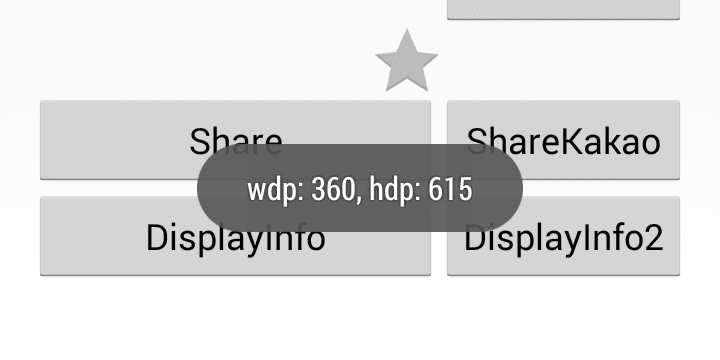
3. Get display size in dp using Configuration

In this method, the screen height is only 615dp which is not same as in DisplayMetrics (640dp), It seems Configuration returns without notification area.

1
2
3
4
5
6
7
@SuppressLint("NewApi")
public static void showScreenSizeDp( Activity activity ) {
    Configuration configuration = activity.getResources().getConfiguration();
    Toast.makeText( activity, 
        "wdp: " + configuration.screenWidthDp + ", hdp: " + configuration.screenHeightDp
        , Toast.LENGTH_SHORT).show();   }   
}

Result:


[Android] NotificationBar Control


1. NotificationBar Hide
if (Build.VERSION.SDK_INT < Build.VERSION_CODES.JELLY_BEAN ) {
    getWindow().setFlags(
        WindowManager.LayoutParams.FLAG_FULLSCREEN,
        WindowManager.LayoutParams.FLAG_FULLSCREEN);
} else {
    View decorView = getWindow().getDecorView();
    int uiOptions = View.SYSTEM_UI_FLAG_FULLSCREEN;
    decorView.setSystemUiVisibility(uiOptions);
}


2. NotificationBar Show
if (Build.VERSION.SDK_INT < Build.VERSION_CODES.JELLY_BEAN ) {
    getWindow().setFlags(
        0, 
        WindowManager.LayoutParams.FLAG_FULLSCREEN);
} else {
    View decorView = getWindow().getDecorView();
    int uiOptions = decorView.getSystemUiVisibility();
    uiOptions &= ~View.SYSTEM_UI_FLAG_FULLSCREEN;
    decorView.setSystemUiVisibility(uiOptions);
}


MainActivity.java
1
 2
 3
 4
 5
 6
 7
 8
 9
10
11
12
13
14
15
16
17
18
19
20
21
22
23
24
25
26
27
28
29
30
31
32
33
34
35
36
37
38
39
40
41
42
43
44
45
package com.example.actionbar;

import android.annotation.SuppressLint;
import android.os.Build;
import android.os.Bundle;
import android.support.v7.app.ActionBarActivity;
import android.view.View;
import android.view.WindowManager;

@SuppressLint("NewApi")
public class MainActivity extends ActionBarActivity {

    @Override
    protected void onCreate(Bundle savedInstanceState) {
        super.onCreate(savedInstanceState);
        setContentView(R.layout.activity_main);
        getActionBar().setTitle("ActionBar Title");
        getActionBar().setSubtitle("ActionBar Subtitle");
    }

    public void onClicNotificationBarHide(View v) {
        if (Build.VERSION.SDK_INT < Build.VERSION_CODES.JELLY_BEAN ) {
            getWindow().setFlags(
                WindowManager.LayoutParams.FLAG_FULLSCREEN,
                WindowManager.LayoutParams.FLAG_FULLSCREEN);
        } else {
            View decorView = getWindow().getDecorView();
            int uiOptions = View.SYSTEM_UI_FLAG_FULLSCREEN;
            decorView.setSystemUiVisibility(uiOptions);
        }
    }
    
    public void onClicNotificationBarShow(View v) {
        if (Build.VERSION.SDK_INT < Build.VERSION_CODES.JELLY_BEAN ) {
            getWindow().setFlags(
                0, 
                WindowManager.LayoutParams.FLAG_FULLSCREEN);
        } else {
            View decorView = getWindow().getDecorView();
            int uiOptions = decorView.getSystemUiVisibility();
            uiOptions &= ~View.SYSTEM_UI_FLAG_FULLSCREEN;
            decorView.setSystemUiVisibility(uiOptions);
        }
    }   
}


activity_main.xml

1
 2
 3
 4
 5
 6
 7
 8
 9
10
11
12
13
14
15
16
17
18
19
<LinearLayout xmlns:android="http://schemas.android.com/apk/res/android"
    xmlns:tools="http://schemas.android.com/tools"
    android:layout_width="match_parent"
    android:layout_height="match_parent"
    android:orientation="vertical" >

    <Button
        android:layout_width="match_parent"
        android:layout_height="wrap_content"
        android:text="Hide NotificationBar"
        android:onClick="onClicNotificationBarHide" />
    
    <Button
        android:layout_width="match_parent"
        android:layout_height="wrap_content"
        android:text="Show NotificationBar"
        android:onClick="onClicNotificationBarShow" />
    
</LinearLayout>


ScreenShot:


1. [Hide NotificationBar] Pressed

2. [Show NotificationBar] Pressed


[Android] ActionBar Control


1. Set ActionBar Title
getActionBar().setTitle("ActionBar Title");

2. Set ActionBar SubTitle

1) show subtitle

getActionBar().setSubtitle("ActionBar Subtitle");
2) remove subtitle
getActionBar().setSubtitle(null);

3. Set ActionBar Icon
getActionBar().setIcon(R.drawable.icon);

4. Hide ActionBar
getActionBar().hide();

5. Show ActionBar
getActionBar().show();


MainActivity.java
1
 2
 3
 4
 5
 6
 7
 8
 9
10
11
12
13
14
15
16
17
18
19
20
21
22
23
24
25
26
package com.example.actionbar;

import android.annotation.SuppressLint;
import android.os.Bundle;
import android.support.v7.app.ActionBarActivity;
import android.view.View;

@SuppressLint("NewApi")
public class MainActivity extends ActionBarActivity {

    @Override
    protected void onCreate(Bundle savedInstanceState) {
        super.onCreate(savedInstanceState);
        setContentView(R.layout.activity_main);
        getActionBar().setTitle("ActionBar Title");
        getActionBar().setSubtitle("ActionBar Subtitle");
    }

    public void onClickActionBarHide(View v) {
     getActionBar().hide();
    }
    
    public void onClickActionBarShow(View v) {
     getActionBar().show();
    }   
}


acctivity_main.xml
1
 2
 3
 4
 5
 6
 7
 8
 9
10
11
12
13
14
15
16
17
18
19
<LinearLayout xmlns:android="http://schemas.android.com/apk/res/android"
    xmlns:tools="http://schemas.android.com/tools"
    android:layout_width="match_parent"
    android:layout_height="match_parent"
    android:orientation="vertical" >

    <Button
     android:layout_width="match_parent"
     android:layout_height="wrap_content"
        android:text="Hide ActionBar"
        android:onClick="onClickActionBarHide" />
    
    <Button
     android:layout_width="match_parent"
     android:layout_height="wrap_content"
        android:text="Show ActionBar"
        android:onClick="onClickActionBarShow" />
    
</LinearLayout>


ScreenShot:

1. [Hide ActionBar] Pressed

2. [Show ActionBar] Pressed